 TrickTic Dictate
TrickTic Dictate
Hold a shortcut, speak, and your words are typed into the app you are using. Dictate in Hebrew or English, with speech models on your own PC or in the cloud.
The app has no account and no analytics. Your audio goes only to the provider you choose, with your own key, or stays on your PC with a local model.
Version 0.36.0 · 46.0 MB · Released October 4, 2026
The installer has no publisher certificate yet, so Windows asks you to confirm it. See how to install.
SHA-256
42ebf7b9684601c4db6ed5bb79646faff2b326b45d1f62e0e743547e98557735- macOS:
- later
Features
Types where you are working
Hold your shortcut in any app, speak, and release. The text is pasted where your cursor is, and a setting can restore your clipboard afterwards.
On your PC or in the cloud
Run Whisper speech models on your own GPU or CPU, or use a cloud provider such as OpenAI or Google Gemini with your own API key.
Recordings are never lost
Audio is saved before it is transcribed. If a transcription fails, retry it from history instead of speaking again.
Your words, your way
A dictionary for names and terms, spoken snippets, and optional cleanup that keeps the raw transcript beside the cleaned one.
Installing on Windows
The installer is not signed with a Microsoft publisher certificate yet, so your browser and Windows cannot show who published it and ask you to confirm. Once installed, the app verifies every update with its own signing key before installing it.
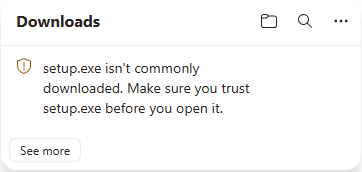
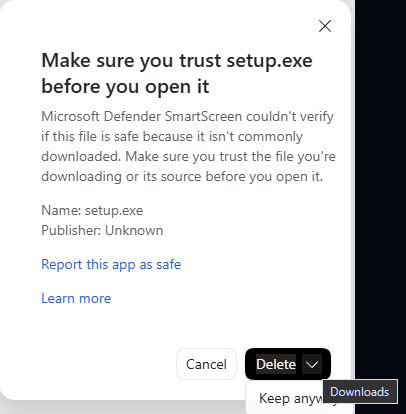
If Edge says the file isn't commonly downloaded
Hover over the download, choose … and then Keep. In the window that opens, open the menu next to Delete and choose Keep anyway. Then open the file from the download list.
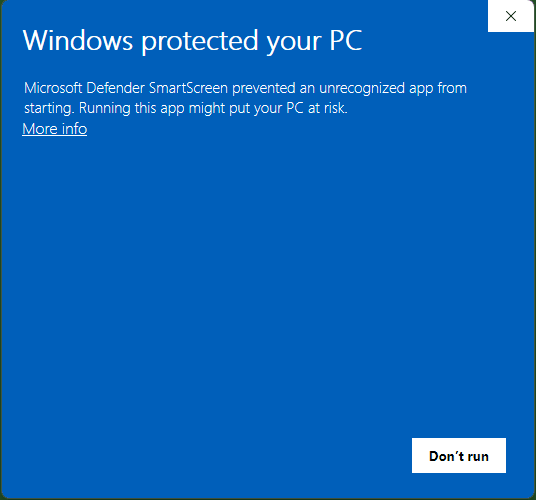
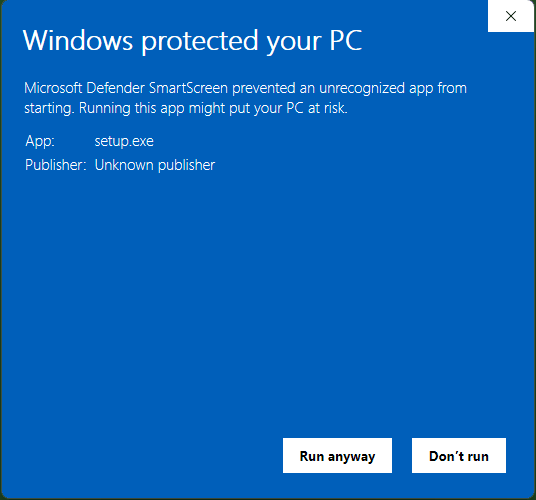
If Windows says "Windows protected your PC"
In other browsers, open the downloaded file. When Microsoft Defender SmartScreen shows Windows protected your PC, choose More info, then Run anyway.
Updating an existing installation
If TrickTic Dictate is already installed, quit it from its tray icon first. Installing keeps your recordings and settings. Use Settings → About to check for updates and install them. If an update is interrupted, rerun the downloaded installer; your saved recordings and settings are kept.
Work computers
Some managed or company PCs block apps without a publisher certificate. Ask your administrator to allow it.
Check the download (optional)
In PowerShell, in the folder you downloaded to, run:
Get-FileHash .\setup.exe -Algorithm SHA256
The Hash it prints must equal:
42EBF7B9684601C4DB6ED5BB79646FAFF2B326B45D1F62E0E743547E98557735System requirements
- Windows 10 or Windows 11, 64-bit (x64).
- Microsoft Edge WebView2 Runtime must already be installed. Windows 11 includes it; on Windows 10, install the runtime from Microsoft before running setup. The installer stops if it is missing.
- Installs for your Windows user only, without administrator rights.
- Local models are downloaded inside the app and need free disk space. A cloud provider needs your own API key and an internet connection.
What's new in 0.36.0
October 4, 2026
# TrickTic Dictate 0.36.0
Windows release for the storage admission fix tested in PR #266.
- Reduces the delay before text insertion when saved dictation history approaches the storage limit. Recent storage measurements can now be reused safely without repeatedly scanning the entire history during one dictation.
- Preserves storage limits, saved recordings, raw transcripts and existing settings. Near-limit writes still receive a fresh storage check.
The isolated Windows preview was tested with 3.9 GiB of copied history and accepted by Daniel as working and fast before release. Source validation and the regression negative control are recorded in `docs/testing/storage-admission-latency.md`.